
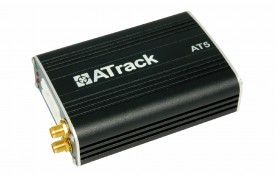


El ATrack AT5i es un dispositivo de seguimiento multifuncional versátil que proporciona información confiable sobre la posición y el estado de movimiento actual de su vehículo a través de la red GPRS. Este rastreador de vehículos también se puede combinar con una variedad de eventos personalizados según sus necesidades. Además, el AT5i es compatible con una amplia gama de aplicaciones de hardware gracias a sus varios puertos digitales y analógicos de E/S.
El AT5i está disponible en dos versiones: una versión GPS única y una versión GPS/GLONASS que procesa simultáneamente. Ambas versiones ofrecen características destacadas que incluyen cifrado de datos AES-128, comunicación de datos a través de SMS/USSD/GPRS (TCP/UDP), detección de manipulaciones y reporte de antena GPS, sensor de velocidad del vehículo (VSS), actualización de firmware a través de FOTA (Firmware Over-The-Air) mediante el protocolo FTP, seguimiento en tiempo real y tala configurables, y hasta 64 geo-cercas definidas por el usuario en formas circulares, rectangulares y poligonales.
Otras características notables del AT5i incluyen configuración de preferencias de itinerancia, eventos de comportamiento de conducción dura, administración de energía configurable, capacidad de registro de hasta 140,000 mensajes y 21,000 mensajes en cola, comunicación de voz bidireccional y escuchas telefónicas, soporte para identificación del conductor a través de 1-Wire® iButton®, sensor de temperatura 1-Wire® y compatibilidad con Garmin FMI 2.0 y superior. Además, el AT5i cuenta con un sistema de control inteligente de eventos para una gestión eficiente de su flota de vehículos.
Configurar AT5i
Para configurar 6ZRddX yvN es necesario configurarlo de siguiente manera. Con el siguiente script
- Configurar el Evento de encendido ACC
Y6wNooJ5Gxg
7iqtgkwiijpo2JaLulo2DeSjhPrT
dtAPwZDJ0rj0yvvYNhnblljbqHO8
GlrlXuP98TBY3 - Configurar el intervalo de actualización en 60 segundos
w4hbdONNn40zzgEEbw - Configurar en modo binario
0UzJVcTL5oZfGmMts - Configurar el APN del operador y el servidor GPRS
p4nwZ7ClBFyLoQnUssR91nnPoFhGbFSjrAfbAO8lMd7TDLM8TAhldThompvXAlZ3NET8MU79F
Para verificar el estado del rastreador use 2AyvFoVoI